
Episode Summary:
So, in today’s show, I’ll make my best to help you choose which desktop Mac to buy for your business.
This is the last of a three-part series where I explore the different Macs that Apple offers at the beginning of 2019.
If you haven’t decided between a laptop and a desktop yet, listen to episode 29 first as I go through a series of question that will help you make up your mind.
In that episode, I said that Apple was offering 4 types of desktop computers when in fact there are really 6 different models to choose from:
- Mac Mini 2018
- 21,5 inch iMac without Retina screen
- 21,5 inch iMac with 4K Retina screen
- 27-inch 5K Retina iMac
- 27-inch iMac Pro
- Mac Pro
With the Mac Mini and the Mac Pro, you’ll need to either purchase a screen, a keyboard and a mouse or re-use existing hardware.
Here’s how I’ve structured today’s episode. I’ll go through each desktop Mac model from the cheapest to the most expensive and for each, I will give the pros, the cons as well as which kind of professional should consider buying it
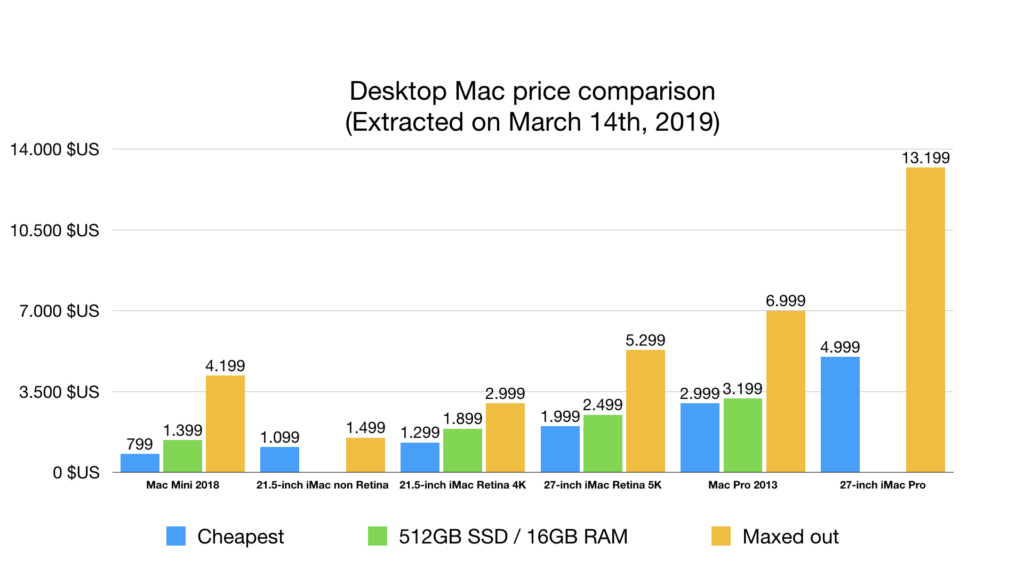
In order to prepare for this show, I’ve created a table with all the models, and their price in three different configurations:
- Cheapest option one can buy and what we get for that
- What I consider a good standard configuration for most people, that is 512GB of internal storage and 16GB of RAM
- And finally, how much it can cost when maxing all the specs out
Pricing comparison (in US dollars extracted from Apple.com on March 14th, 2019)

Mac Mini 2018
Pros:
- Small footprint and thus can be rack mountable
- Give the opportunity to connect a computer screen bigger than 27-inches
- Four Thunderbolt 3 ports which can drive a 5K display or two 4K displays or connect to an eGPU
- Integrates the new T2 chip from Apple for increased security and faster disk encryption
- Can be upgraded to a 6-core CPU, 2TB SSD, 64 gigs of Ram and even a 10 Gigabit Ethernet connection
Cons:
- Need to buy a screen separately and, in most cases, a webcam too, since most third-party screens don’t integrate it
For whom?
- A professional who wants a bigger screen, like a 32 or even a 38-inch ultrawide model (like the ViewSonic VP3881)
- For musicians and software developers who want a reliable machine
- Also good in a conference room or an exhibition hall
Fully equipped, it’s clearly fitting into pro territory, and it’s not a coincidence that the 2018 Mac Mini model comes in space grey, like the iMac Pro.
21,5 inch iMac without Retina screen
Pros:
- Cheapest iMac in town, fully upgraded it only costs about 1500 dollars
- All-in-one with SDXC card reader and that’s about it
Cons:
- Limited to 256GB SSD and 16GB of RAM
- Non-retina screen
- Slowest machine (processor and spinning hard drive by default)
- Only 2 Thunderbolt 3 ports
For whom?
Professional on a budget who only does e-mail and web browsing and uses a desktop occasionally or in a hotel lobby
21,5 inch iMac with 4K Retina screen
Pros:
- Retina screen
- All-in-one with SDXC card reader
- Cheaper than the 27-inch 5K model
Cons:
- Limited to 1TB SSD and 32GB of RAM
- Only 2 Thunderbolt 3 ports
For whom?
Professional with a budget of up to $2000 who mainly does e-mail and web browsing and uses the computer on a daily basis
27-inch 5K Retina iMac
Pros:
- Retina screen and higher resolution than the 4K model so more space on the desktop
- Can be fitted with a 2TB SSD or a 3TB Fusion drive (even if I don’t recommend the Fusion technology)
- Can be fitted with up to 64GB of RAM
Cons:
- Pricey for office-type work
For whom?
Professional who wants a gorgeous 27-inch screen, lots of internal disk space and occasionally does some photo or video editing
Mac Pro 2013
I won’t go into much details about this computer because it has not been updated for the past 6 years and Apple is offering an even more powerful machine since December 2017; the iMac Pro.
The professional who needs the kind of computing power should either wait for the successor of the Mac Pro or buy the iMac Pro.
27-inch iMac Pro
Pros:
- Intel Xeon processor starting with 8 cores and upgradeable up to an 18-core model
- Can be fitted up to 4TB of SSD and 128GB of Ram
- Has four Thunderbolt 3 ports
- The only other desktop Mac equipped with the T2 Security chip
Cons:
- Cost: starting at $5000 and can go up to $13200
For whom?
Professional graphic designer, photographer or videographer or app/game developer or involved with music or movie production. If you’re not sure you need it, it’s simple, you don’t.
Conclusion/Summary
If you have an existing screen or want one bigger than 27-inch and you don’t need the power offered by the iMac Pro, then you should buy the 2018 Mac Mini.
If your budget is tight and need a computer for office-type work, then the 21 inch with 4K retina screen is the obvious choice.
If you have a budget between $2000 and $5000, then you should directly go for the 27-inch 5K Retina iMac.
And finally, if you need as much power as possible and your budget is above $5000, the latest iMac Pro will most probably make you very happy, unless you’re OK to wait a bit more until Apple releases the successor of the 2013 Mac Pro.