
TL;DR
Apple’s new $599 MacBook Neo is tempting, but it’s actually a downgrade for most solopreneurs already running M-series MacBooks—unless you’re upgrading from an iPad or need an ultra-lightweight secondary machine.
The real sweet spot for business use is the MacBook Air, which offers better performance, MagSafe charging, and genuine long-term value.
Watch now
Listen now
Summary
When Apple released the MacBook Neo at $599, I had to investigate whether this could be a game-changer for solopreneurs like us.
So I headed to the Apple Store to compare it side-by-side with the MacBook Air, and what I discovered surprised me—but not in the way you’d expect.
Here’s the reality: if you already own any recent MacBook with an Apple Silicon chip, the Neo is genuinely a downgrade.
The A18 Pro chip performs well on single-core tasks like email and web browsing, but the moment you do what we actually do as solopreneurs—running a video call while working in a spreadsheet while your email syncs in the background—those extra cores matter enormously.

The M-series chips in the Air and Pro models are 35-100% faster in multi-core performance, which is where real business work happens.
The charging situation also caught my attention.
While the MacBook Air uses MagSafe (keeping both USB-C ports free), the Neo charges through one of its USB-C ports, leaving you with just one free port when you’re at your desk.

That’s dongle territory again, and frankly, it’s a step backward.
However, there is a specific situation where the Neo makes perfect sense: if you’re currently using an iPad Air with a Magic Keyboard.
That setup costs around $1,400, and you’re still limited by iPadOS.
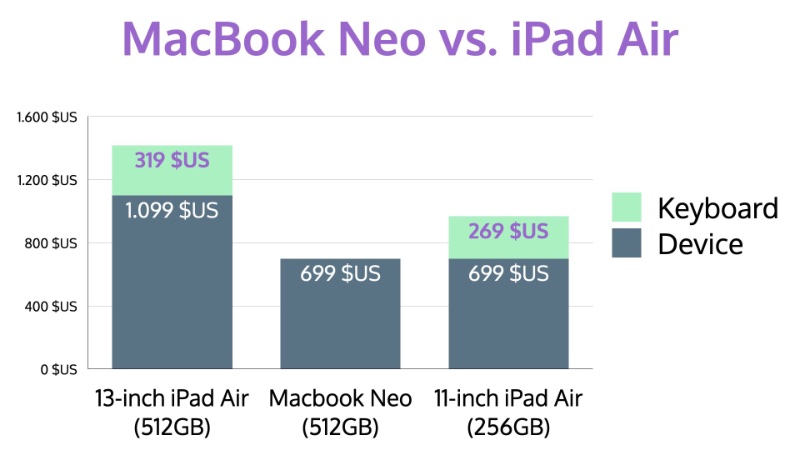
The Neo at $699 gives you full macOS for half the price, with real file management, desktop apps, and proper multitasking.
The other consideration is security.
The base $599 model lacks Touch ID—it only has a Lock key.
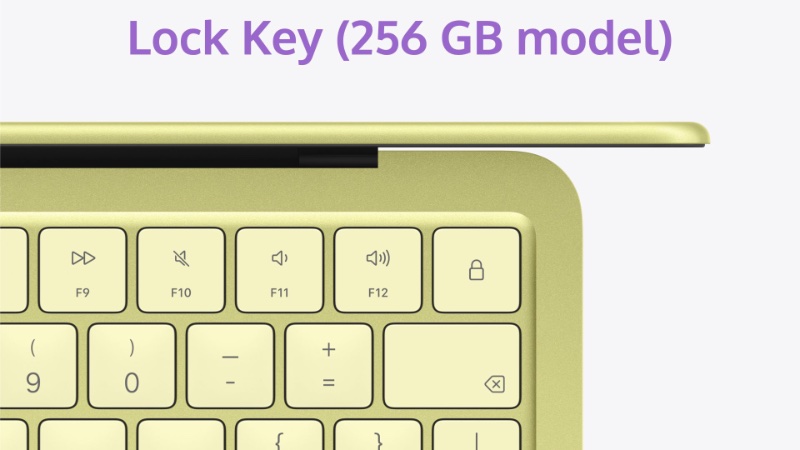
For anyone handling client data or financial information, Touch ID is non-negotiable.
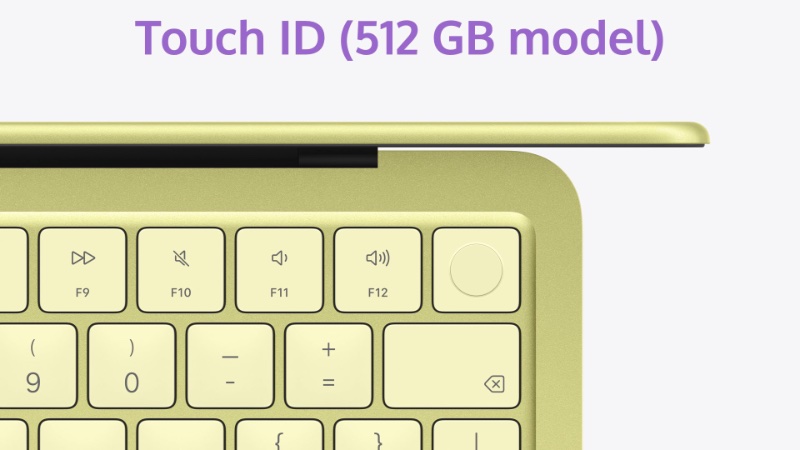
So the real starting price is actually $699, not $599.
There’s one more dealbreaker that I haven’t mentioned yet: local AI.
If you follow this show, you know I’m a strong advocate for running AI models locally on your Mac—using tools like LM Studio or Ollama—to keep your data 100% private.
This matters especially if you handle sensitive client information.
With only 8GB of memory, the MacBook Neo scrapes by at the bare minimum for Apple Intelligence basics like Siri improvements and writing tools.
But even running small language models locally really benefits from 16GB, so there’s enough headroom left for macOS itself.
The moment you want to use vision or agentic AI models locally, 16GB becomes the bare minimum—and 32GB is recommended.
And if you want to run models with more than 30 billion parameters, you’ll need at least 32GB, ideally 64GB or more.
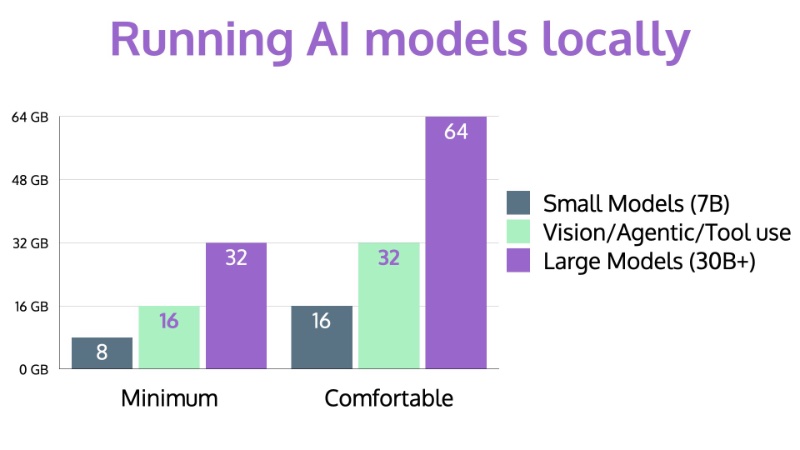
If data privacy through local AI is something you care about or plan to adopt, the MacBook Neo should be ruled out entirely.
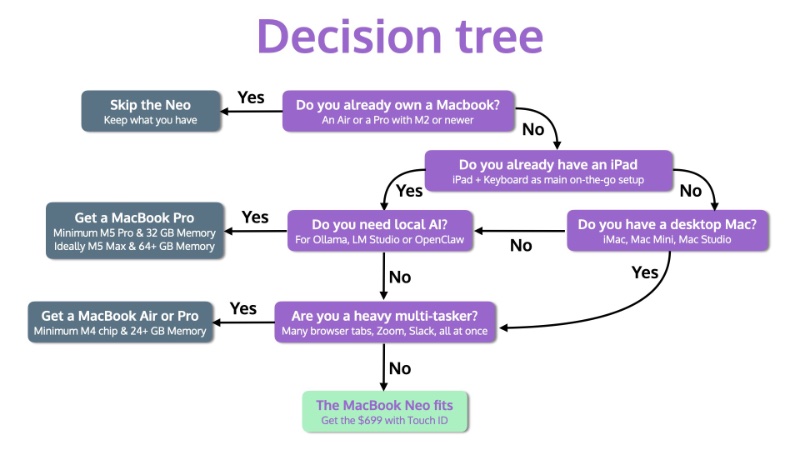
My final recommendation? If you don’t already own a MacBook, the Neo could work as a lightweight secondary machine—but only if you don’t need to run AI locally and you’re not a heavy multitasker.
But for most solopreneurs, the extra $400 for a MacBook Air is a smarter investment.
You get MagSafe, 16GB of RAM, superior performance, and a machine that will serve your business well for years to come.
Main Takeaways
- Multi-core performance matters for real work: The MacBook Neo’s A18 Pro chip handles single tasks smoothly, but falls 35-100% behind M-series chips in multi-core performance—critical when juggling video calls, spreadsheets, and background syncing simultaneously.
- MagSafe charging is a business essential: The Neo charges through a USB-C port, leaving only one free port at your desk. The MacBook Air’s MagSafe keeps both USB-C ports available for accessories and peripherals—a significant productivity advantage.
- Touch ID is non-negotiable for solopreneurs: The base $599 model lacks Touch ID, making the real starting price $699. For anyone handling client data or financial information, biometric security isn’t a luxury—it’s essential for protecting sensitive business information.
- The Neo only wins against iPad setups: If you’re currently using an iPad Air with Magic Keyboard, the MacBook Neo offers full macOS at half the price. For everyone else with existing MacBooks, it’s a downgrade.
- 8GB of RAM limits future-proofing and AI capabilities: Eight gigabytes is the bare minimum for Apple Intelligence, but it leaves little headroom for macOS itself. If you plan to run local AI models for data privacy, you need at least 16GB—pushing you toward the MacBook Air anyway.
- Long-term value favors the MacBook Air: The $400 price difference may seem significant today, but the Air’s superior ports, double the RAM, better performance, and longer software support make it the smarter long-term investment for a business machine.
- The A-series chip introduces uncertainty: The Neo uses an A-series chip instead of the proven M-series architecture. We don’t yet know if Apple will support it with macOS updates as long as M-series machines, adding risk to a four-to-five-year business investment.
- Heavy multitasking reveals the Neo’s limitations: If you regularly keep multiple browser tabs open, run Zoom while Slack is active, and work with spreadsheets simultaneously, 8GB of RAM will struggle. The MacBook Air’s 16GB handles this workload without breaking a sweat.
Subscribe from your favorite podcast player






FULL TRANSCRIPT (Click here)
Why Most Solopreneurs Should Skip the MacBook Neo (But Not All)
Intro
Damien Schreurs
Apple just released its cheapest MacBook ever, five ninety-nine, and I went to the Apple store to check it out side by side with the MacBook Air.
What I found generally surprised me, and convinced me that most solopreneurs should not buy this machine.
But there’s one specific situation where it actually makes a lot of sense.
I’ll unpack all of this after the intro.
Nova AI
Welcome to Macpreneur, the show for seasoned solopreneurs looking to streamline their business on a Mac.
Unlock the secrets to saving time and money with your host and technology mentor, Damien Schreurs.
Welcome & The Core Question
Damien Schreurs
Hello, hello.
If this is your first episode, welcome to Macpreneur, and if you’re a longtime follower, thank you for tuning back in.
As a fellow solopreneur, I appreciate that you dedicate these minutes with me.
Now today, we are going to talk about the brand new MacBook Neo that Apple released on March 11th, 2026, and I want to be upfront.
This is not the traditional tech review.
There are plenty of those on YouTube already.
Instead, I want to answer a very specific question: Does this machine make sense for someone running a solo business on a Mac?
And by the way, if you’re wondering whether your current Mac setup is optimized for your business, I have created a 360 degree tech diagnostic that you can grab at macpreneur.com/diagnostic.
The link is in the description.
First Impressions: Size, Weight, and Display
Damien Schreurs
So let’s start with the basics.
What exactly is this machine?
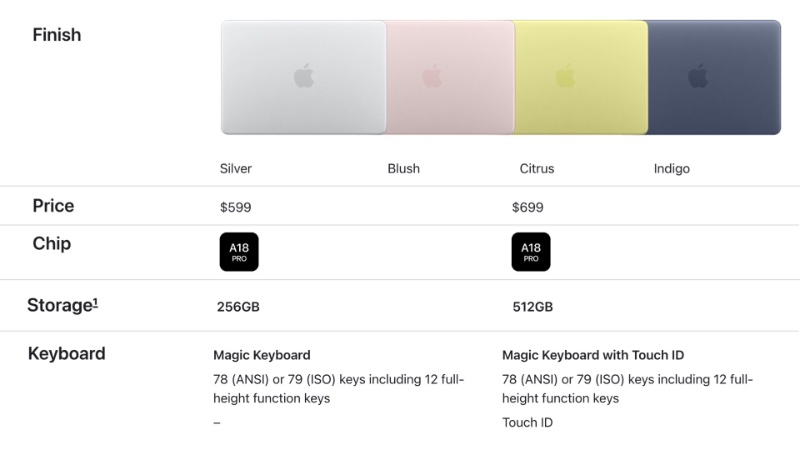
Well, it is Apple’s cheapest Mac laptop ever, at five ninety-nine, the base model, six ninety-nine with Touch ID, and five hundred twelve gigabyte of storage.
It has a thirteen inch Retina display and it comes in four colors: silver, blush, citrus, and indigo.
And yes, it is using an A18 Pro chip, same chip family as the iPhone, so it’s not an M-series chip.
And it only has eight gigabyte of unified memory, period.
Not possible to upgrade at all.
It is positioned below the MacBook Air in Apple’s lineup and is available since March 11th, 2026.
So on paper, it seems interesting and appealing, at least at that price.
But as busy solopreneurs, we can’t just look at the product page.
We need to ask, will this actually help me run my business better?
So let me walk you through what I discovered when I went to the Apple store.
The first thing that struck me was the size and weight.
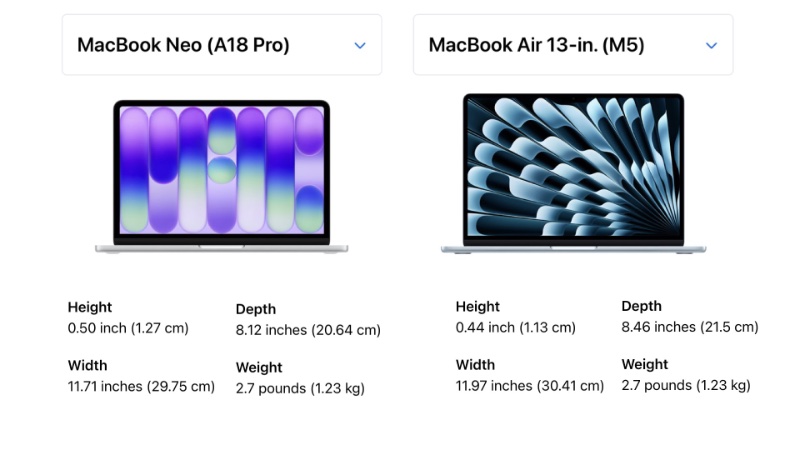
I expected the MacBook Neo to feel noticeably smaller or lighter than the MacBook Air, and it doesn’t.
In fact, standing there with both ma- both machines, the Air actually felt lighter in my hands, even though they have the same exact weight.
Probably because the Air is slightly thinner, I felt it was lighter.
So if you’re thinking, “I’ll get the Neo because it is more portable,” that’s not really the case.
And then comes the display resolution.
I went into system settings on both machines and I compared the display resolutions.
The MacBook Neo had a slightly lower resolution than the MacBook Air, fewer pixels on the screen.
Now, it is not a dramatic difference, but if you’re someone who works with visual content or need to see two windows side by side, it is worth knowing.
The Devil’s in the Details: Charging and Ports
Damien Schreurs
And then another detail really got my attention: charging.
The MacBook Air charges via MagSafe, which means that both USB-C ports remain free for accessories.
But the MacBook Neo charges through one of its USB-C port, so when you’re charging, which, let’s be honest, is most of the time when you’re at a desk, you only have one free USB-C port.
And on top of that, it is not a USB3 port, but a USB2 port, so it’s even slower than on MacBook Air.
And if you need an external display and a USB device at the same time, you will be back in dongle land.
Performance Breakdown: The A18 Pro vs. M-Series Chips
Damien Schreurs
These observations at the Apple store were revealing, but the real question is, what does this mean for how you run your business?
Let me break down the scenarios.
If you already own any recent MacBook, whether it’s a MacBook Air or MacBook Pro with an Apple silicon chip, there is genuinely no reason to consider the MacBook Neo, and I want to show you why with actual numbers.
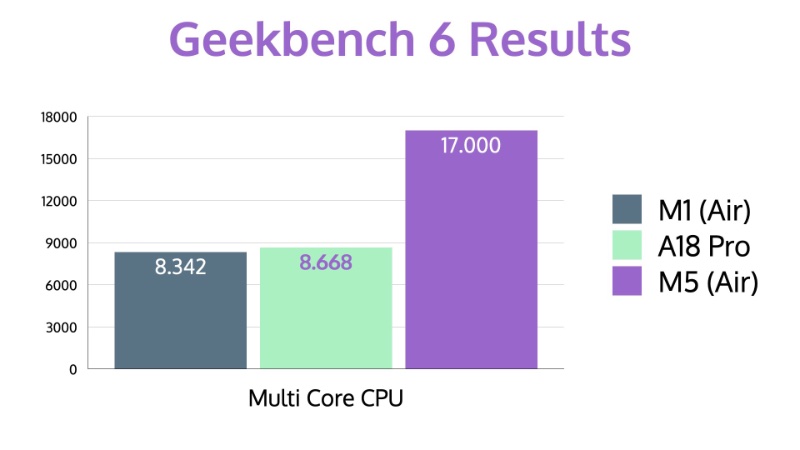
In single core performance, the A18 Pro in the Neo is right between the M1 that was released in 2020 and the latest, the M5 chip.
It’s even very close to the M4 chip released in 2024.
But here’s where the picture changes dramatically.
In multi-core performance, the A18 Pro barely edges out the M1.
And it falls way behind everything else.
The M3 is about thirty-five percent faster.
The M4 is over seventy percent faster, and the M5, well, it’s roughly double the performance.
And that’s because the A18 Pro only has six cores with just two performance cores, compared to eight or ten cores on the M series chips.
What, what does that mean in practice?
Well, for single tasks, writing an email, browsing the web, editing a photo, the Neo will feel snappy.
But the moment you start doing what solopreneurs actually do, meaning running a video call while working in a spreadsheet while your email syncs in the background, those extra cores matter a lot.
So if you already have an M series MacBook, the Neo will be a downgrade in multicore performance, in GPU power, and in memory, as well as port flexibility.
Even an M2 MacBook Air is a better business machine because of MagSafe charging and a more capable architecture.
So in that case, I would suggest that you keep what you have.
The Ideal User: Upgrading from an iPad Setup
Damien Schreurs
Now, here’s where it gets interesting.
If your current on-the-go setup is an iPad with a Magic Keyboard, then the MacBook Neo deserves a serious look.
And so, let’s do the math.
An iPad Air, thirteen inch with five hundred twelve MB of storage costs $1,099.
If you add a Magic Keyboard, you’re looking at a total of $1,400, and you’re l- still limited by iPad OS.
The MacBook Neo at $699, that’s the one with Touch ID and five hundred twelve gigabyte of storage, gives you full macOS for half the price of this iPad combo.
MacOS means real file management, full desktop app, multi-tasking, browser extensions, and everything else that iPadOS still struggles with.
Even the eleven inch iPad Air with two hundred fifty-six gigabyte of storage and the combo with the keyboard is more expensive than the Neo.
The Secondary Machine Dilemma: Neo vs. Air
Damien Schreurs
But what about the MacBook Air?
For solopreneurs mostly relying on web-based services like Google Workspace, Trello, HubSpot, Canva, or web-based LLMs like ChatGPT or Claude, the Neo handles all of that without breaking a sweat.
And with the MacBook Air starting at $199, you could say, “Yeah, I can save $400 by going with the Neo with equivalent storage space and Touch ID capability.”
The problem here is if you are a very heavy multi-tasker, like you have many browser tabs open, Zoom is running, Slack is open, and you have opened a bunch of spreadsheets all at once, in that case, your eight gigabyte of RAM will start to struggle.
But what if you already have a desktop Mac, an iMac, a Mac mini, or a Mac Studio, and you want something cheap and portable for working at coffee shops or when traveling?
Then, the Neo could work as a lightweight second mach- machine.
But honestly, for the $400 difference, I would still point most solopreneurs toward the MacBook Air instead.
Better ports, MagSafe charging, double the RAM, and potentially longer software support make that extra investment worthwhile for a business machine.
The only situation where the Neo wins as a second machine is if you truly only need it for very lightweight tasks, like email, web browsing, light document editing, and those $400 savings matter more to you right now than the longevity of the machine.
The Dealbreaker: Local AI and Memory Limitations
Damien Schreurs
Now, if you’ve been following this show, you know that I’m a big advocate for running AI models locally on your Mac using tools like MacWhisper or LLaMA, LM Studio, and so on to keep your data one hundred percent private.
This is especially important for solopreneurs who handle sensitive client information.
However, with eight gigabytes of memory, you would get, with the MacBook Neo, the bare minimum memory requirement for Apple Intelligence.
So yes, the features like Siri improvements, writing tools, those kind of things would work.
However, even running small language models locally would really benefit from sixteen gigabyte of memory so that there is enough left for macOS itself.
As soon as you want to use vision or agentic models locally, sixteen gigabyte becomes the bare minimum.
And actually, thirty-two gigabyte would be recommended in those cases.
And finally, if you want to run local models with more than 30 billions of parameters, which by the way, is still ten or to twenty times fewer than what we use in the cloud, then your Mac should have at least 32 gigabytes of memory, ideally 64 gigabytes or more.
And so if data privacy through local AI is important and something that…
Or something that you are planning to adopt, then the MacBook Neo should be ruled out.
You need at least 16 gigabyte, which means a MacBook Air at minimum.
Future-Proofing Your Investment
Damien Schreurs
Which brings me to an important point about future-proofing.
As solopreneur, we tend to be price sensitive.
I get it, I am too.
And when we invest in a machine, we want it to last at least four to five years.
And here I have a few concerns.
First, the Neo uses an A-series chip, not an M-series one, and we don’t know yet whether Apple will support it with macOS updates as long as they support M-series machines.
I really, really hope so.
However, we have definitely entered a brand new territory, so I cannot…
Second, Apple Intelligence features are going to become more demanding over time.
Will the eight gigabyte keep up in 2028 or 2029?
Again, I hope so, but there are no guarantees.
And third, the MacBook Air at $1099 with 16 gigs of RAM and an M5 chip is almost certainly going to have a longer useful lifespan, which means fewer years before you need to buy again because you realize you need more storage or more memory.
So the, the savings today could actually cost you more in the long run if you need to replace the Neo sooner.
Something to factor into your decision.
A Critical Note on Security: Touch ID is Non-Negotiable
Damien Schreurs
One quick but critical point about security.
The base $599 MacBook Neo model does not have Touch ID.
It has what Apple calls a Lock key.
For any solopreneur handling client data, financial information, or business account, Touch ID is not a luxury, it’s a security essential.
It lets you unlock your Mac, authorize payments and sign into apps and site with your finger tips so you really avoid any direct observation that you would have if you had every time to enter your password with the keyboard.
So the real starting price, really, for a solopreneur is $699, not $599.
Keep that in mind.
Final Recap and Recommendations
Damien Schreurs
So let me recap this for you.
The Neo makes sense if you don’t already own a MacBook Air or a MacBook Pro with an Apple Silicon chip, and you don’t need to run AI locally, and you are not a heavy laptop multi-tasker.
Now, if you don’t already own a Mac laptop and you need to run AI locally, I would recommend to get a MacBook Pro minimum with an M5 Pro and 32 gigs of memory, but ideally, you want to invest in an M5 Max and the more memory that your budget allows.
And even if you don’t need to run AI locally on your Mac, spending the extra $400 on a MacBook Air is a smarter long-term investment.
It gives you MagSafe, 16 gigs of RAM, M5 performance, and a machine that will serve your business well for years to come.
Call to Action & Sign-Off
Damien Schreurs
So I’d love to hear from you in the comments or on social, uh, what is your current portable setup and are you tempted by the MacBook Neo?
Just let me know.
I’m really curious.
And if you found this episode helpful, please share it with a fellow solopreneur and tag me on Instagram.
My handle is @macpreneurfm.
Finally, don’t forget to check out the 360 Degree Tech Diagnostic at macpreneur.com/diagnostic.
It will help you figure out if your current Mac setup is truly optimized for your business.
And again, you can also find a link in the description.
And until next time, I’m Damien Schreurs, wishing you a productive day.
Nova AI
Thank you for listening to the Macpreneur podcast.
If you’ve enjoyed the show, please leave a review and share it with a friend right now.
Latest episodes
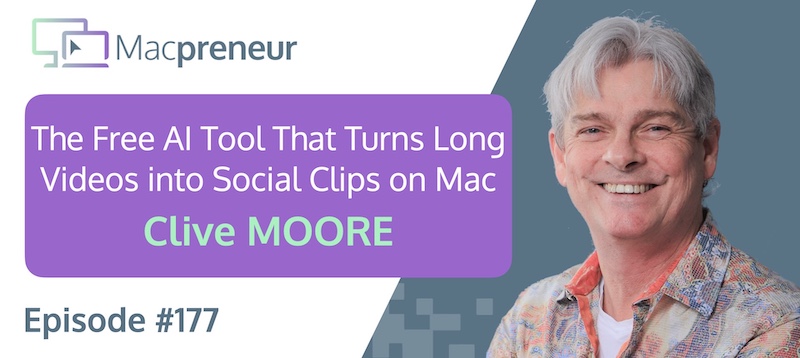
MP177: The Free AI Tool That Turns Long Videos Into Social Clips on Mac with Clive Moore
Clive Moore uses a Mac-centered AI workflow to turn long videos into ready-to-publish social clips, run language models locally, and automate agency work.
The real lesson: combine simple built-in tools with carefully managed AI workflows instead of paying for complexity by default.
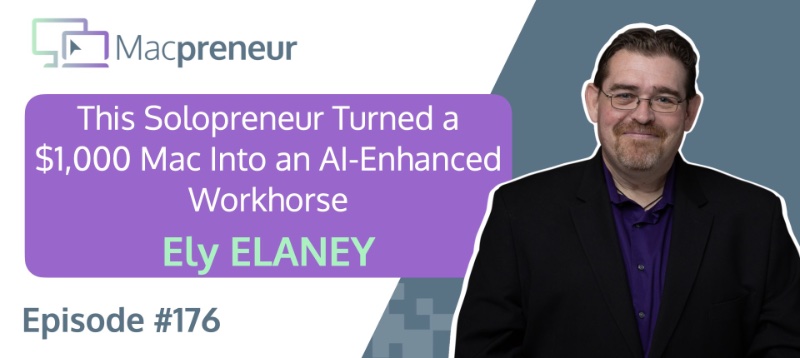
MP176: How This Solopreneur Turned a $1,000 Mac Into an AI-Enhanced Workhorse with Ely Delaney
TL;DR Ely Delaney turned an affordable Mac mini into a dependable, AI-enhanced workhorse for content, email marketing, and relationship-building. The real lesson: use AI to accelerate your expertise, not to replace the human judgment that makes your work effective. Connect with Ely Delaney Website: https://connectwithely.com/ LinkedIn: https://www.linkedin.com/in/elydelaney Watch now https://www.youtube.com/watch?v=FrIYMPUdths Listen now Affiliate disclosure Resources…