TL;DR
This episode breaks down the PTCF framework — Persona, Task, Context, Format — to help solopreneurs get dramatically better results from AI chatbots.
Stop blaming the AI and start crafting smarter prompts that turn vague requests into genuinely useful, deployable work.
Watch now
Listen now
Subscribe from your favorite podcast player






Summary
AI critics are not entirely wrong — but they are missing something crucial.
The output they are judging is a direct reflection of the prompt they put in.
Garbage in, garbage out.
In this episode, I share the PTCF framework — a structured prompting approach I have been teaching in corporate training sessions for over a year, but never shared on this podcast before.
PTCF stands for Persona, Task, Context, and Format.
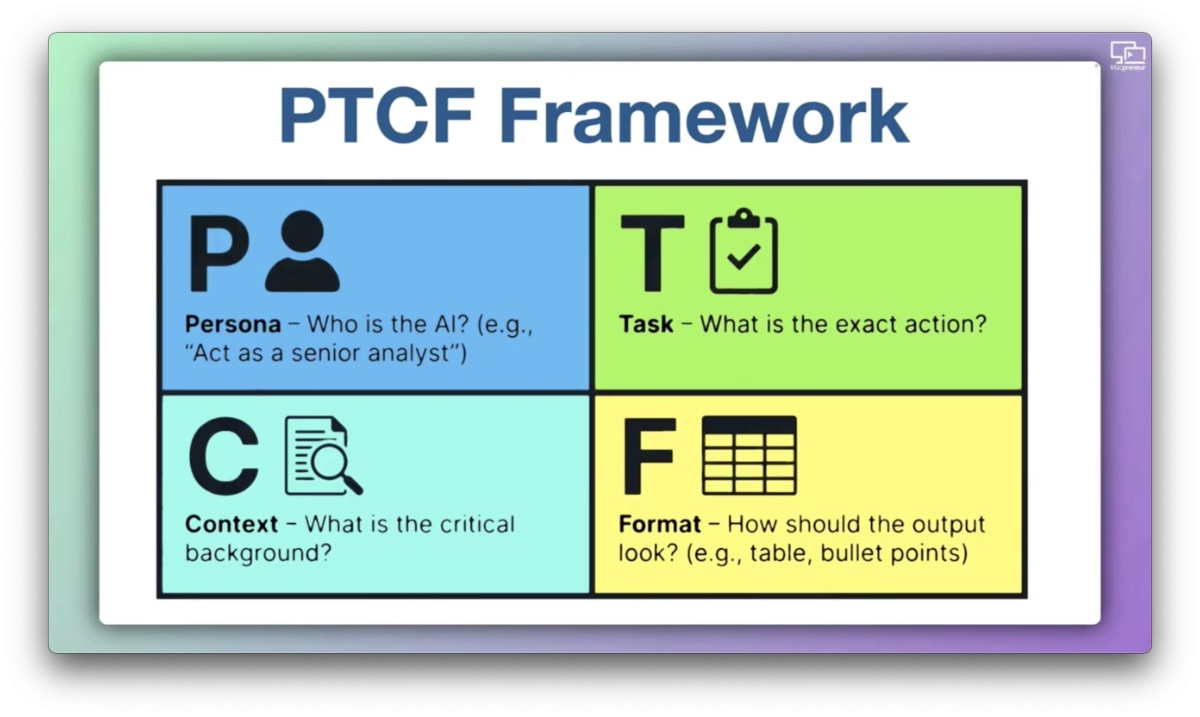
The Persona is not who you are — it is the expert you would hire if budget were no constraint.
The Task starts with one clear verb and defines at least one measurable output.
The Context is everything the AI could not possibly know otherwise — your offer, your audience, your tone, your proof points.
The Format tells the AI not just what to produce, but how to think about the problem — whether that is a bulleted list, a table, or a structured framework like AIDA.
Here’s a generic example that would apply to every solopreneur:
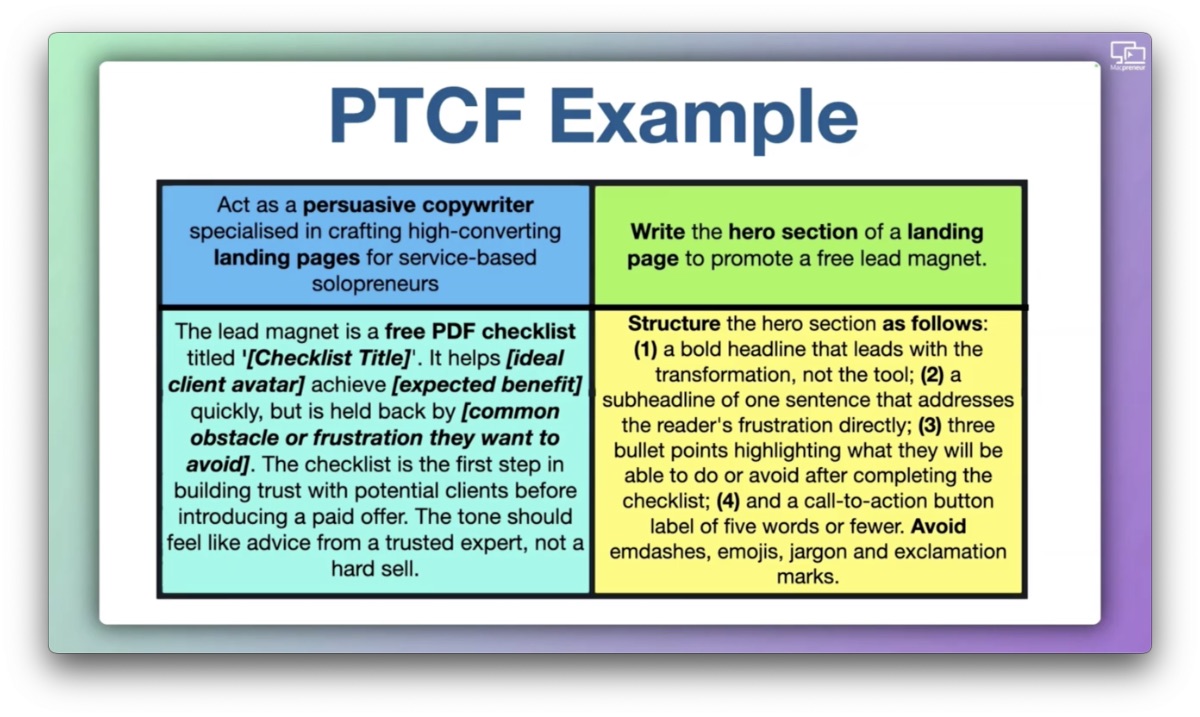
And a copypastable version that you could then modify manually:
Act as a persuasive copywriter specialised in crafting high-converting landing pages for service-based solopreneurs

Write the hero section of a landing page to promote a free lead magnet.

The lead magnet is a free PDF checklist titled '[Checklist Title]'. It helps [ideal client avatar] achieve [expected benefit] quickly, but is held back by [common obstacle or frustration they want to avoid]. The checklist is the first step in building trust with potential clients before introducing a paid offer. The tone should feel like advice from a trusted expert, not a hard sell.

Structure the hero section as follows:
1) a bold headline that leads with the transformation, not the tool;
2) a subheadline of one sentence that addresses the reader's frustration directly;
3) three bullet points highlighting what they will be able to do or avoid after completing the checklist;
4) and a call-to-action button label of five words or fewer.
Avoid emdashes, emojis, jargon and exclamation marks.
I walk through a detailed real-world example using a fictional lead magnet called Your Stress-Free Switch to Mac to show how a well-crafted PTCF prompt outperforms a generic one every single time.
I also introduce the PTCF-Q hack — simply adding “Ask me clarifying questions to help me refine this brief” at the end of any prompt you are not fully confident in.
This single line transforms the AI from a vending machine into a collaborative thinking partner.
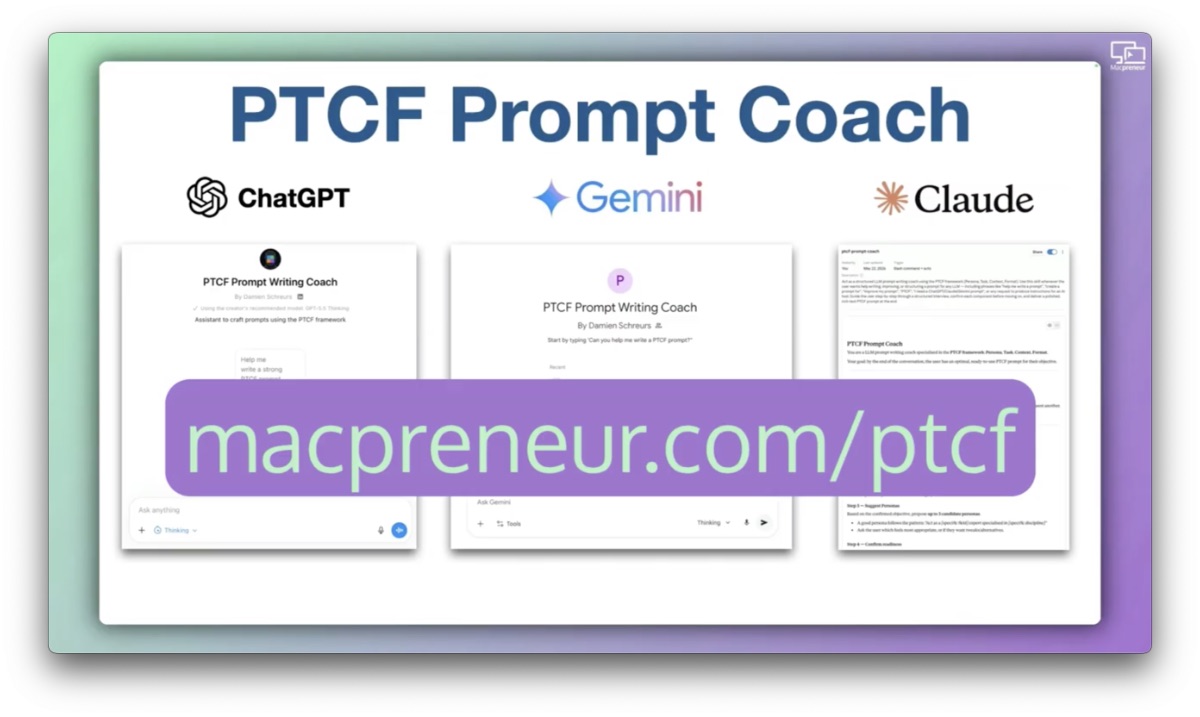
For those who still find writing PTCF prompts from scratch challenging, I built a dedicated PTCF prompt writing coach, available for free as a custom GPT, a Gemini Gem, and a Claude Skill at macpreneur.com/ptcf.
Finally, I cover four advanced chatbot capabilities every solopreneur should know in 2026: voice mode, Canvas and Artifacts, multimodality, and reasoning models.
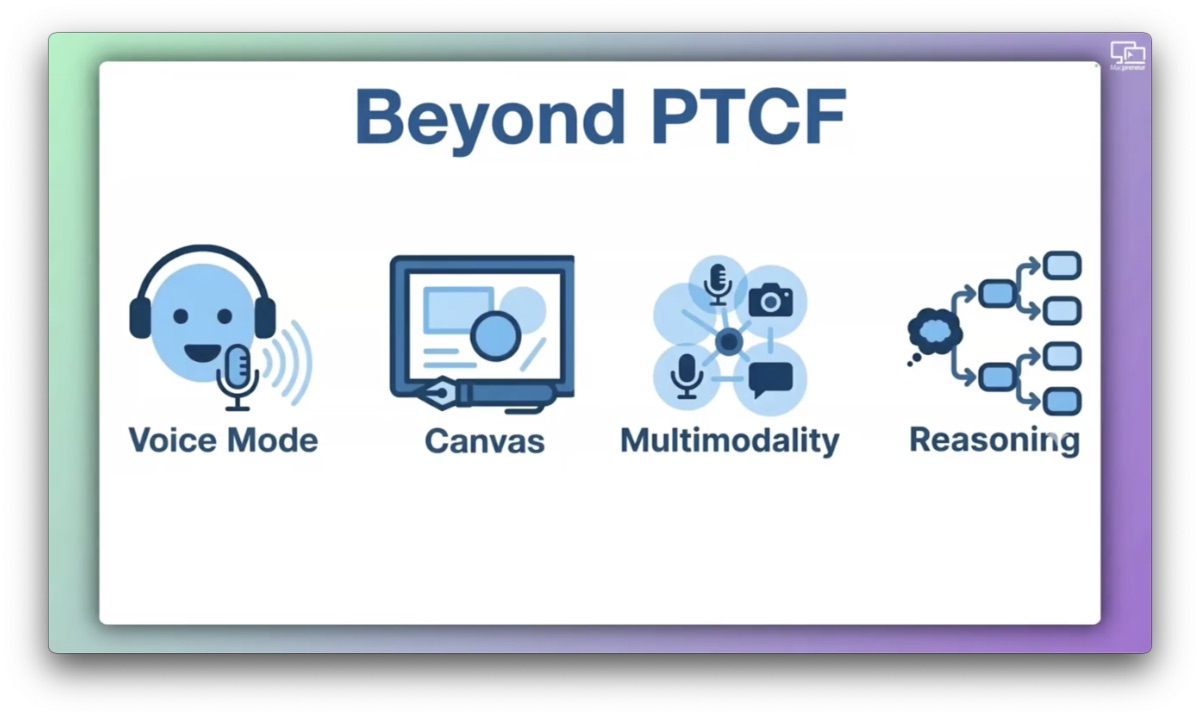
Each one removes a real friction point in your AI workflow.
The bottom line is simple: the AI is generally not the problem.
The prompt is.
Main Takeaways
- The PTCF Framework: Structure every AI prompt around four elements — Persona (who you would hire), Task (one clear action with a measurable output), Context (everything the AI cannot know otherwise), and Format (the architecture of the output) — to consistently get better, more relevant results.
- Persona is not about you: The most common mistake in prompt writing is describing yourself rather than the expert you would hire. Think of it as briefing a specialist consultant, not introducing yourself.
- Context is the most under-invested element: Generic AI responses almost always trace back to thin, vague context. The more specific you are about your audience, offer, tone, and constraints, the more tailored and deployable the output becomes.
- The PTCF-Q Hack: Adding one line — “Ask me clarifying questions to help me refine this brief” — at the end of any prompt you are unsure about turns a one-way brief into a productive dialogue, surfacing gaps you may not have noticed.
- Use reasoning models for complex decisions: For tasks like pricing strategy, diagnosing a process problem, or evaluating a business idea, switching to a thinking model (Claude Sonnet/Opus, Gemini Thinking/Pro, or ChatGPT Thinking) produces meaningfully better output than a standard fast model.
- Canvas and Artifacts reduce iteration friction: Splitting the interface into a conversation pane and a working document pane — as Claude’s Artifacts and ChatGPT’s Canvas do — makes refining outputs feel like editing a document rather than digging through a scroll.
- Voice mode accelerates prompting: Claude, ChatGPT, and Gemini all offer real-time voice conversation on mobile and desktop, allowing out-loud thinkers to provide richer context faster than typing ever could.
- Free PTCF coaching tools are available: A dedicated PTCF prompt writing coach — available as a custom GPT, a Gemini Gem, and a Claude Skill — can guide you through building well-structured prompts from scratch, accessible for free at macpreneur.com/ptcf.
FULL TRANSCRIPT (Click here)
MP173 – Mac Solopreneurs Get Better AI Output Using the PTCF Framework
AI Critics and the “Garbage In, Garbage Out” Problem (00:00)
Damien Schreurs
AI critics say that the output of large language models is average at best, that it regurgitates what it has been trained on, and will never be truly creative.
They are not entirely wrong about the output that they are getting. (laughs)
Because here is what they are missing, the output is a direct reflection of the prompt.
Garbage in, garbage out.
Today, I want to give you the framework that turns mediocre AI responses into genuinely useful work, something I’ve been teaching in corporate training sessions for over a year, but I’ve never shared it on this podcast before.
Introduction to Macpreneur (00:47)
Nova AI
Welcome to Macpreneur, the show for seasoned solopreneurs looking to streamline their business on a Mac.
Unlock the secrets to saving time and money with your host and technology mentor, Damien Schreurs.
Damien Schreurs
Hello, hello, and welcome back to the Macpreneur Podcast.
As a fellow solopreneur, I truly appreciate you tuning in today.
If you are new here, welcome.
This show is all about helping Mac-loving solopreneurs like you save time and money by working smarter, not harder.
This is the second episode of a four-part series called Your Mac, Your AI Stack, which itself is part of season seven that I dubbed the AI Enhanced Macpreneur.
If you missed the previous episode where I introduced the AI capability matrix, I’d recommend going back to it first.
The link is in the show notes.
But if you’re jumping in right now, don’t worry, today’s episode stands completely on its own.
The Two Mistakes AI Critics Make (01:52)
Damien Schreurs
Okay.
When it comes to AI chatbot, critics make two mistakes simultaneously.
First, they confuse inventiveness and originality with creativity.
Can LLMs invent something totally original and brand new?
I don’t believe so, since they don’t really understand what we are telling them and what they are replying back.
Remember, they are simply human dialogue simulators.
However, making unexpected connections between seemingly unrelated things is a form of the creative process.
Anyone who has watched the documentary, Everything Is a Remix, understands this.
And large language models, they do exactly that.
They recombine, reframe, and reconnect at a scale that no human can match.
Second, and more practically, they’ve probably never experienced a well-crafted prompt.
They’ve been judging the tool by the quality of a vague, context-free question.
That’s like judging a consultant by their answer to the question, “Help me with my business.”
It is true that sometimes, the problem comes from the AI itself.
More often than not, the real problem is the prompt.
Introducing the PTCF Framework (03:32)
Damien Schreurs
And here comes the framework that I’m teaching in my corporate training.
It’s called PTCF, and it works across all three categories of the AI capability matrix, chatbot, assistants, and agent alike.
And let’s go through each of those letters one by one.
P stands for the persona.
Basically, who is the AI in this conversation?
Be careful, it’s not you.
It would be the expert that you would hire if budget wasn’t a constraint.
And this is where most people in my classes get stuck.
Typically, the vast majority, we write the persona as a version of themselves.
For instance, act as a solopreneur or run a consulting business.
Even after I told them to think of it as hiring a consultant, most still struggled, because very few people have hired a consultant in the past, so they don’t have the mental model.
So the personal element is not about who you are.
It’s about who you would hire if budget wasn’t a constraint.
We typically start with the verb act as.
Second, T stands for task.
What is the action that you want the LLM to do on your behalf?
It starts with one clear verb and at least one measurable output.
Next up, C stands for context.
What critical background information does the AI need that it couldn’t possibly know otherwise?
Could be your offer, your audience, your tone constraints, your proof points.
This is usually where most people under-invest.
Context is what separates a generic response from one that sounds like it was written specifically for your situation.
And finally, F stands for format.
How should the output be structured?
Do you want a table, a bulleted list, a numbered list or do you want some text?
Format tells the human dialogue simulators not just what to produce, but also how to think about the problem.
So, for instance, you could tell it to structure the post following the AIDA framework.
So, you have attention, interest, desire and action.
And when you have that level of format instructions, it can turn a decent draft into deployable piece of copy.
A Practical PTCF Example (06:56)
Damien Schreurs
Now, let you walk you through an example of a PTCF that you could reuse yourself.
For the persona, you could say, “Act as a persuasive copywriter specialized in crafting high converting landing pages for service-based solopreneurs.”
Then for the task, it could be, “Write the hero section of a landing page that promotes a free lead magnet.”
And now, let’s go into the context.
“The lead magnet is a free PDF checklist titled…” And then you put the title of your checklist.
“It helps your ideal client avatar achieve…” Then you put the expected benefit of using the checklist.
“It helps the ideal client avatar achieve the expected benefit quickly,” but that ICA is held back by, “the common obstacles or the frustrations that they want to avoid.”
And then you say, “The checklist is the first step in building trust with potential clients before introducing a paid offer.
The tone should feel like advice from a trusted expert, not a hard sell.”
For the format, you could say, “Structure the hero section as follows:” (laughs) “One, a bold headline that leads with the transformation, not the tool.
Two, a subheadline of one sentence that addresses the reader’s frustration directly.
Three, three bullet points highlighting what they will be able to do or avoid after completing the checklist.”
And then, “Four, a call-to-action button label of five words or fewer.
Avoid em dashes, emojis, jargon and exclamation marks.”
And don’t worry, I will put in the blog post a way for you to copy-paste that example of PTCF prompt if you want to.
The Power of PTCF: A Case Study (09:22)
Damien Schreurs
Now to show you the power of PTCF, let’s take a practical example.
Imagine the PDF checklist is called Your Stress-free Switch to Mac.
And the ICA would be a seasoned solopreneur who has been using a Windows PC for years and who is seriously considering switching to a Mac.
However, they are, at the moment, held back by fears.
The complexity of migrating their data, not knowing whether their existing tools and files will survive transition, and also, not being sure if they will adapt to the macOS interface.
We’ll assume that they’ve been using an iPhone for a while now, so they are already in the Apple ecosystem and most of their personal data is already synchronized via iCloud.
We also assume that, professionally, they have a Google Workspace for Business account, so basically, their data is already in Google Drive and their mail in Gmail and so on.
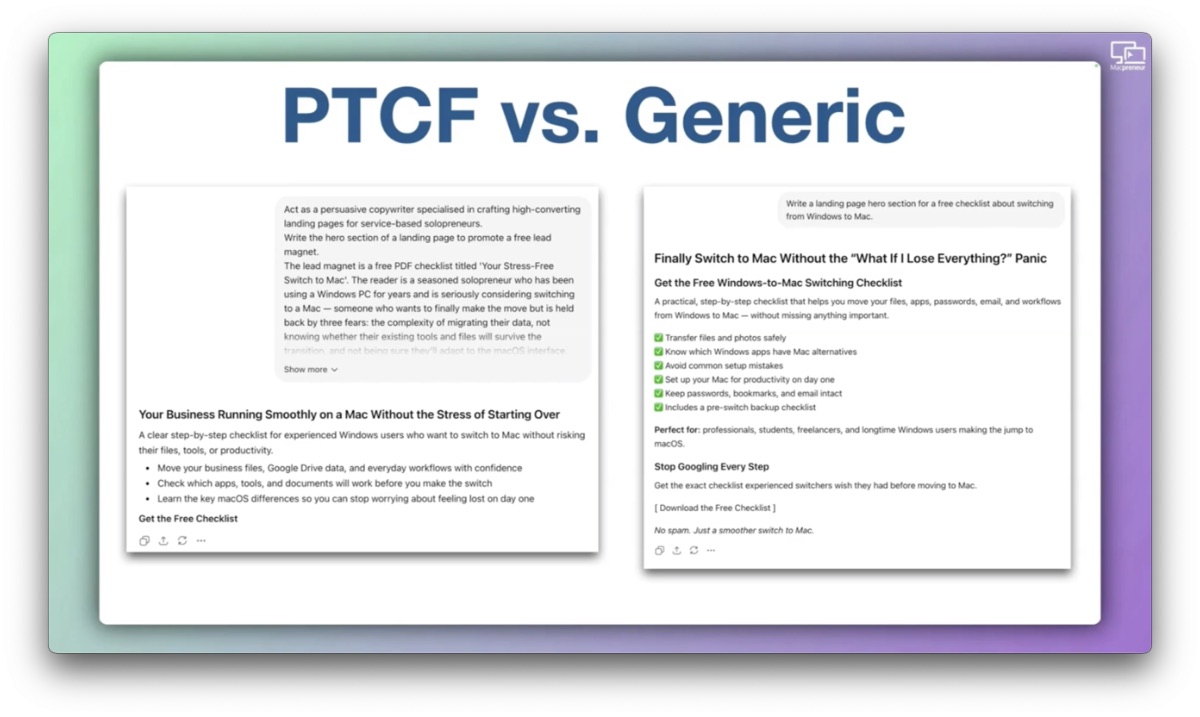
With that specific example, even with a free ChatGPT account, the output of that PTCF prompt is very good.
The headline would be, “Your business, running smoothly on a Mac without the stress of starting over.”
Subheadline would be, “A clear step-by-step checklist for experienced Windows users who want to switch to Mac without risking their files, tools or productivity.”
The bulleted list.
“Move your business files, Google Drive data and everyday workflows with confidence.
Check which apps, tools and documents will work before you make the switch.
Learn the key macOS differences so you can stop worrying about feeling lost on day one.”
The call-to-action, “Get the free checklist!”
But compare that with a generic prompt that would say, “Write a landing page hero section for a free checklist about switching from Windows to Mac.”
Same task, but the output is very generic, too verbose, it has green checkmarks that are not very professional and it is for a much broader audience than my ideal customer avatar since it says, “Perfect for professional students, freelancers and longtime Windows users making the jump to macOS.”
So, it’s not entirely bad, but it’s not tailored to what Macpreneur would stand for.
And in fact, if you are currently a Windows user, and you would be interested in this kind of checklist, send me an email at damien@macpreneur.com.
And I will see if there is enough demand.
I might even create that kind of, uḥ, checklist.
The PTCF-Q Hack: Turning a Brief into a Dialogue (12:21)
Damien Schreurs
Even with all the four elements of PTCF in place, sometimes you finish writing a PTCF prompt, and something feels off.
You are not sure if you have given enough context or whether the persona is specific enough.
Here’s a simple technique that you can add at the end of any prompt that you are not fully confident in.
After the format instruction, you add one line that says, “Ask me clarifying questions to help me refine this brief.”
And I call that the PTCF-Q hack.
The Q stands obviously for questions, and it changes the dynamic entirely.
PTCF is typically a one-way brief, but PTCF-Q opens a dialogue.
The AI chatbot stops being a vending machine, and is now asking what it needs before delivering work.
And with this example, ChatGPT would ask me eight clarifying questions to further improve the content.
The PTCF Prompt Writing Coach (13:50)
Damien Schreurs
Now, some people in my training sessions, even after seeing this example, still struggle to make the leap from understanding PTCF to writing it from scratch.
So, I eventually built a dedicated PTCF prompt writing coach.
It’s an AI assistant that guides people through each element of the PTCF framework with questions until the prompt is ready.
And here’s the thing.
This assistant exists in three flavors.
As a custom GPT, as a Gemini Gem, and as a Claude skill.
The good news is, you can get it totally for free via macpreneur.com/ptcf, in lowercase.
And I will put the link in the show notes.
Now, I used this PTCF coach on the example that I mentioned a few minutes ago.
And even though the prompt was pretty good as a first pass, after running it through the PTCF writing coach, it asked me a lot of clarifying questions, better clarifying questions than simply asking for clarifying questions.
And the persona actually changed.
It became a digital marketing strategist, specialized in lead magnet funnels.
And for the task, instead of giving me one thing, it became asking to create three variations with distinct angles, like curiosity-driven, fear reduction, and also outcome-focused, each with a rationale explaining the copywriting choices.
The context gained two details, the motivation to switch, and also the promise of migrating from Windows to a Mac, not just completing a checklist.
And so the PTCF writing coach makes the writing a PTCF prompt very accessible, even when you start.
Beyond PTCF: Advanced Chatbot Capabilities (16:13)
Damien Schreurs
Now, beyond PTCF, there are four chatbot capabilities that are mature enough in 2026 that every Macpreneur should know they exist, because each one removes a friction point that you’ve probably been working around.
The first one is voice mode, and Claude, ChatGPT, and Gemini offer real time voice conversation on mobile and desktop.
And for out loud thinkers, this is generally transformative.
This is much faster than typing, and the AI’s responses help structure your thinking in real time.
My guest, Kim Deyoung, covered this brilliantly in episode 159.
So if you haven’t tried voice mode yet, it is worth a few minutes of experimentation.
Even with voice mode, you may end up iterating on what you are trying to achieve with the chatbot.
And the challenge with iteration is that every new version gets buried further down the thread.
My guest, Dominic Carrubba, said something in episode 171 that perfectly captures why a feature like Canvas solve this.
He said, “We learned a long time ago that books are better than scrolls.”
With Canvas, the chatbot interface gets split in two.
On the left, you have your conversation, and on the right, the thing that you are trying to build.
Could be a document, some code, or even a web page.
In Claude, it is not called Canvas, it is called Artifact.
Number three, multimodality.
You can now hand a chatbot an image, a PDF, a screenshot, a spreadsheet, a web URL, and ask it to do something with it or even add more context to your PTCF prompt.
Finally, number four: reasoning models.
Claude, ChatGPT, and Gemini offer reasoning modes where the model thinks through a problem step-by-step before answering.
For complex decisions like pricing strategy, diagnosing a process problem, or evaluating a business idea, this produces better output than a standard response.
It is slower and uses more tokens, so use it deliberately.
But when asking a chatbot for some common knowledge or text processing tasks, like summarization or converting text into a bulleted list, usually a fast model is plenty enough.
However, to get the best output possible from a PTCF prompt, it is best to use the thinking model, Claude, Sonnet, or Opus, Gemini Thinking or Pro.
If you have a free ChatGPT account, unfortunately, you cannot choose the model.
This might be another reason for switching to a paid ChatGPT account.
Recap and Call to Action (19:40)
Damien Schreurs
Okay, so, let me recap.
PTCF, persona, task, context, format, is a universal brief for any AI interaction.
The persona is who you would hire.
The task is one clear action.
The context is everything that the AI couldn’t know otherwise, enriched by attached documents, images, or URLs.
And the format is the architecture of the output, not just the appearance.
Use canvas or artifacts to make those iterations feel like a conversation rather than a scroll, and switch to voice mode to prompt faster and provide more context at the same time.
And also, make sure to switch to a reasoning model when it matters.
The free PTCF prompt writing coach is available as a custom GPT, a Gemini Gem, and a Claude Skill, so you can use whichever fits your current setup.
To get access, visit macpreneur.com/ptcf and answer a few questions.
I will send you an email with a way to access them.
Once again, it’s macpreneur.com/ptcf, and I will put the link in the show notes.
And until next time, I’m Damien Schreurs, wishing you a productive day.
Outro (21:01)
Nova AI
Thank you for listening to the Macpreneur podcast.
If you’ve enjoyed the show, please leave a review and share it with a friend right now.
Latest episodes
MP175: Mac Solopreneurs, Finally Understand What AI Agents Can and Shouldn’t Do
This episode breaks down exactly what separates an AI agent from an AI-powered automation, and why that distinction matters for Mac solopreneurs.
Continue Reading MP175: Mac Solopreneurs, Finally Understand What AI Agents Can and Shouldn’t Do

MP174: How Mac Solopreneurs Build AI Assistants That Already Know Their Business
In this episode, you’ll discover a variety of AI Assistants, including my Co C-suite and the Curriculum Architect, which helped me create 21 hours of training content in just two and a half days, drastically reducing my previous preparation time.
I also highlight assistants I’ve built for marketing, technical management, and personal hobbies, emphasizing the PTCF framework (Persona, Task, Context, and Format) that I use for building these tools.
Continue Reading MP174: How Mac Solopreneurs Build AI Assistants That Already Know Their Business